Monday, February 17, 2014

EDET543 Week 7 PLN Reflection & Visualization

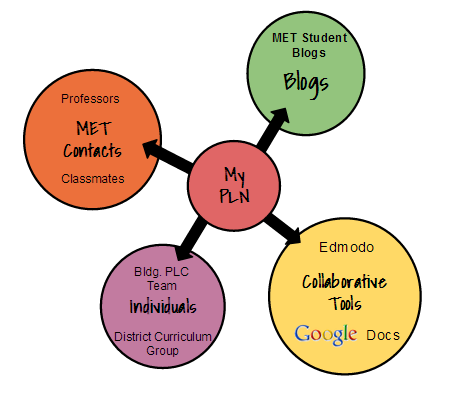
When I started thinking about how my PLN has grown during this course, I began with how my PLN looked prior to starting Online Applications for Collaboration. As sad as it appears below, I had just four tools that were all at a very basic development.
PLN at start of EDET 543
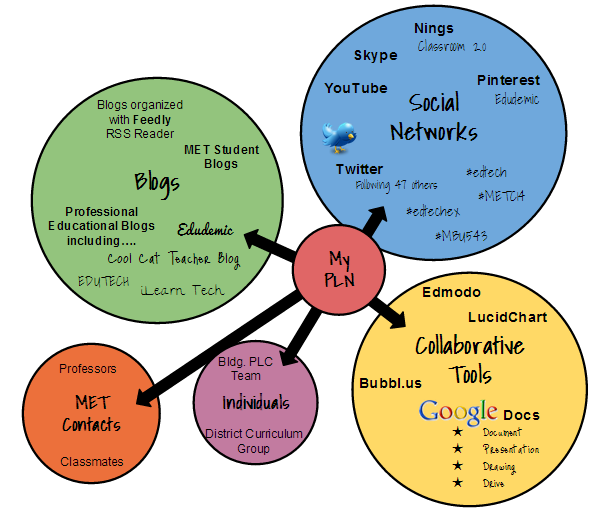
Now in week seven of the course, I was able to add a significant amount of resources to my PLN.  I am surprised (and a little embarrassed) at how much I was able to grow my PLN in such a short amount of time.  I gained significant development in the areas of Blogs and Collaborative Tools and added a new area of Social Networks to my PLN.  Even though I was extremely leery at first, I have become a huge supporter of Social Networks in PLN's now. You can see that it is actually one of my PLN's largest components below.
Current PLN
I look forward to adding more contacts, resources, and tools to my PLN in the future. I'm confident that the next visualization of my PLN will  be even better!

Sunday, February 16, 2014

EDET543 Twitter Chat Experience

I participated in several Twitter chats over the last two weeks.  Prior to EDET 543, I had never explored Twitter yet alone participated in a chat.  I had high anxiety about "tweeting" correctly, but it was quickly put to rest once the chats started.  My fist chat was with Educational Technology Examples #edtechex.  Next, I participated in #mosnowchat with other home-bound Missouri educators on one of our many snow days.  Finally, last Tuesday I tried to participate in Education Chat #edchat while following #METC14 at the hospital.  There was one other chat that didn't work at all.  Early on, I attempted a chat with Web 2.0 Tools in Teaching #web20tools but was unable to find any conversations concurring the day I tried.

My chat experience was different for each one, but each chat was informative and inspiring. My favorite chat was my first with #edtechex due to the size of it.  While there were several of us participating, it wasn't as overwhelming as #edchat.  I quickly felt comfortable asking questions and responding to the moderator's questions. In #edchat, the chat was so fast paced it was very intimdating. I loved recognizing some of the participants in #mosnowchat but encountered terrible spamming that made it frustrating to try to follow the chat.  Again, the moderator's questions were relevant and interesting, but the spam made me stop prior to the full hour.  While I was unable to attend METC due to a family emergency, I enjoyed reading the tweets of those in attendance through #METC14.  It helped make me feel more connected to the conference but increased my desire to attend.  

I went into this Twitter Chat assignment dreading it and left feeling more informed and eager to participate in more chats.  Through the chats, I started following several new people.  With the help of the resources provided by Professor Hartman, I was easily able to find chats that addressed topics that were interesting to me.  I liked the variety of chats available and the flexibility of the assignment.  Not only could we select our chats, but we were given ample time to complete them.  My overall Twitter chat experience was wonderful even with a few glitches. I definitely went from a Twitter skeptic to a believer and will be encouraging my colleagues to give Twitter a try.

Thursday, February 6, 2014

EDET543 Week 5 Social Networks Reflection

Prior to starting my MET, I never realized the role social networks could play in a teacher's PLN or in the classroom. The resources are astonishing and, if I am completely honest, a little overwhelming.  Throughout all the changes in education that I've encountered (19 years and counting), I always tried to remain current with strategies, philosophies, and resources.  I attended workshops, seminars, etc. on a regular basis and always tried to read professional publications.  Having experienced a sliver of what social networks can offer, I'm sad as I wonder how much I've missed and how much more my students could have gained.  Social networks not only offer a greater variety of materials and resources but do so from the comfort of the classroom at no charge.

In the fifth chapter of Web 2.0 How-to for Educators, Solomon and Schrum (2010) address how social networks can be beneficial to both teachers and students.  I  appreciated how they mention that "educators as well as students want to communicate with others" (p. 81). As I taught today, a day and a half after a snow day and one day before a Friday, my students made a point to demonstrate the necessity to "chat" while learning. :) I also enjoyed reading the specific examples of classroom use of social networks. The examples helped me envision the true value of social networks for students.

The first social network I chose to explore was Classroom 2.0. I signed up for an account but liked that I could still explore while waiting for acceptance.  I tried not to become overwhelmed with all the information and choices available just on the home page.  I looked at group options and did a search for special education.  I selected The Inclusion Revolution-Technology in Special Education group and discovered a Free and Inexpensive Adaptive Technology Database that I know will be helpful.  From keyboard and mouse alternatives to dictation and screen reading, options and information is provided.  I also looked at a group for Cell Phones in Education and found an interesting discussion on success stories and good practices.  The final aspect of Classroom 2.0 that intrigued me was my ability to create my own group and select the privacy settings appropriate for my students.  While I usually use Edmodo, I could use Classroom 2.0 for my classes' blogs, chats, and lessons.

I also looked at Pinterest due to its focus on visual images.  Many of my students are visual learners, and I can see benefits from pictures rather than words to gain interest or introduce concepts.  For myself, I liked The Best Web 2.0 Tools (by Edudemic) and Teaching Ideas and Apps (by Vicki Davis aka "Cool Cat Teacher") boards.  I also discovered a Dyslexia board by Dr. Erica Warren that offered some great tools.  GATE-Gifted and Talented by Lauren Sekovski shared ideas for project based learning and even had a "Coding for Kids" pin.  While I was learning and gaining ideas, I truly believe my students could do the same if involved in Pinterest.  Students could use a Pinterest board to brainstorm project ideas, develop group work, or share suggestions to improve learning.  A board could also be created to introduce a concept.  In Social Studies or Geography, the images themselves can tell a story and spark interest.  Students could even create their own boards to demonstrate understanding (while learning at the same time).  I am eager to learn more about how I could incorporate Pinterest into my classroom.  In the meantime, I am pinning ideas for myself.

Solomon, G., & Schrum, L. (2010). Web 2.0 how-to for educators. Eugene, Or.: International Society for Technology in Education.

Thursday, January 30, 2014

EDET543 Week 4 Networked Classrooms Reflection

Richardson and Mancabelli (2011) address the advantages and challenges of a networked classroom as well as the changes necessary to have a networked classroom in Chapter 3 of Personal Learning Networks (p. 59-82).  Thanks to the help of the three classroom examples of networked classrooms, I can see this as not only a possibility but also a probability.  What I mean by that statement is I feel like I am gaining the skills to be able to create a networked classroom and can see educational settings moving in this direction.

The benefits or advantages of a networked classroom are listed and discussed in Chapter 3, and I was planning on sharing the one benefit that I thought was most important or significant (Richardson & Mancabelli, 2011, p. 62).  So... after rereading the seven items over several times, I came to the conclusion that they are all important.  If forced to pick, I would say the collaborative and learning centered aspects of a networked classroom appealed to me the most.  At the 6th grade level, students are all about the social aspect of school but need guidance to use their skills for educational purposes.  Students often overlook or do not recognize each other's educational strengths.  Richardson and Mancabelli (2011)remind us that "none of us is as smart as all of us," (p. 62).  Students also need this reminder.  Encouraging students to work together as they learn to become self-directed and self-motivated learners is a challenge.  A networked classroom would create an environment where skills and strategies for learning content would be emphasized rather than rote memorization of facts.

The disadvantages of a networked classroom are addressed as challenges rather than disadvantages.  Of the five listed by Richardson and Mancabelli (2011), "safety and ethical use" is the challenge most concerning to me (p.75).  Obviously, there are "dangers" associated with online activity.  I find students face these dangers with or without educators by their sides. I hope that by teaching safety and appropriate use while engaging in learning activities the same safe use at home is promoted.  While the other four challenges could potentially be obstacles, I agree that none are so significant to warrant avoidance of a networked classroom.

I am excited about transitioning to a networked classroom but also anxious.  I will certainly listen to Richardon and Mancabelli (2011) when they suggest to "start small" and "embrace uncertainly and failure" when making the change (p. 82).  The second suggestion will be difficult for me, as I don't like to think I've failed at anything.  Afterall, who likes to fail especially when it might impact our students?  My colleagues have come to accept my somewhat OCD and perfectionism tendencies.  Working with others also making the move to a networked classroom so I could share and compare experiences would be extremely helpful.  I can definitely see the necessity of a PLN where successes, failures, questions, and answers could be shared.

One of the most exciting aspects of networked classrooms is its ability to meet the needs of diverse learners.  From accessing experts in the fields being studied to traveling around the world while remaining in their desks, the experiences and options seem endless.  I can envision students discovering the "why" and "how" in lessons.  Abstract concepts can become visualized and difficult lessons can come to life for those who might otherwise struggle academically.  As Richardson and Mancabelli (2011) state, a networked classroom "increases student engagement while sharpening the skills students will need when they finish their schooling," (p. 63).  I can't imagine any educator not wanting that for each of their students.

Richardson, W., & Mancabelli, R. (2011). Personal learning networks: using the power of connections to transform education. Bloomington, IN: Solution Tree Press.

Thursday, January 23, 2014

EDET543 Week 3 Twitter Reflection

Prior to this week, I have never used or explored Twitter.  When people talked about Twitter and their "tweets" it was from a strictly social, personal perspective.  Honestly, I don't have the time to tweet about going to lunch or other minor daily occurrences, so I never had an interest in joining.  I didn't realize the professional aspect of Twitter or how much I was missing.  Having spent hours on it in the last two days (thanks to two extra snow days!), I am very excited about Twitter's potential as an integral part of my PLN and its place in the classroom.  Solomon and Schrum (2010) mention Edmodo as another sharing resource (p. 36).  I am familiar with this tool and actually use it frequently in my class.  I appreciate the secure and private aspects of Edmodo and will likely continue to use it for student use.  However, for my PLN, I can see Twitter playing a key role.

I do have concerns about the time factor of keeping up with my Feedly account and now TweetDeck.  My life, like many of yours, tends to get very busy.  I usually am strong at prioritizing and remaining organized in chaotic situations, but right now I"m struggling a little.  My family is my top priority, and I often step away from school work to play a board game or watch a basketball practice.  Our farm responsibilities also are ranked highly, as animals can't always provide for themselves.  (This cold weather has been quite tiring!)  That leaves any "extra" time left for my classroom plans and MET classes.  Luckily, sometimes I can intermix the two.  I read Professor Hartman's comment about not overwhelming us with Twitter this week, and I greatly appreciated her consideration.  As I work on this post, I hear "chirps" of new Tweets waiting to be read.  A change in settings might be necessary to maintain my sanity. :)

My other worry is about tweeting.  As a first-time Tweeter, I worry about making mistakes or not sending it out correctly.  I found the resources that were included in this week's folder extremely helpful.  Two aspects stood out to me.  First, I like that Richardson & Mancabelli (2011) gave the advice to begin contributing to Twitter by retweeting (p. 43).  This, I feel more confident doing. I'm hoping that once I get started, I'll also contribute original ideas.  The second suggestion was to not read every tweet and to accept that the tweets will come in too quickly to deal with. Betcher reassured me that I "don't need to read every tweet" (Twitter Handbook for Teachers document).  This, I'm going to have to accept and learn to select specific tweets to read. Overall, I am excited to discover Twitter will likely be an invaluable resource professionally and look forward to seeing how it could be utilized in the classroom.

 My Twitter name: @DDaniel115

Richardson, W., & Mancabelli, R. (2011). Personal learning networks: using the power of connections to transform education. Bloomington, IN: Solution Tree Press. 

Solomon, G., & Schrum, L. (2010). Web 2.0 how-to for educators. Eugene, Or.: International Society for Technology in Education.

Wednesday, January 15, 2014

EDET 543 Week 1-2 Reading Reflection

The introduction and first two chapters of our Personal Learning Network book highlight the changes taking place in education, give recommendations for adjusting to and handling the changes, and encourage appropriate use of technology.  Within the chapters, the necessity for continuous teacher growth and development in the implementation and uses of technology is emphasized.

The introduction mentions the changes in technology and tools occurring "with dizzying speed" and I couldn't agree more (Richardson & Mancabelli, 2011, p. 6).  Being in education for 19 years, I have witnessed many changes in the classroom.  During my first year of teaching, I had a portable chalkboard (yes, it was on wheels) and no computer at all in my room.  Wow, as I teach in my current room with 30 computers and observe students using technology, it is very different now.

Students truly do not know a world without personal technology and social networking.  My building is not a BYOD school, so students still detach themselves from their devices for the entire school day.  For many, this causes great distress and anxiety to be "disconnected" from the outside world.   However, for as tech savvy as my 6th graders are, they find it hard to utilize all the educational advantages that technology offers.  I can confirm what Richardson and Mancabelli (2011) say about students being  knowledgeable about social networking, but not knowing "how to use these tools for learning," (p. 7).  I'm sure when student knowledge and maturity allow them to utilize all features, they will be amazed at what they are able to accomplish!  The quote about the educational shift from Stephen Downes in Chapter 1, immediately made me think about Common Core.  With the help of technology, reaching the goal of students taking charge of their own learning will certainly be easier (Richardson & Mancabelli, 2011, p. 21).

I like that Chapter 2 addresses the possible tools that may be used and the responsibility that comes with their use.  Being a responsible digital citizen is a topic I try to emphasize each day to my students.  "If you put something in digital form, you can't assume it won't be shared" is frightening but must be considered (Richardson & Mancabelli, 2011, p. 38).  Many students (and adults) sometimes forget this and can later regret previous posts or pictures they shared. As this chapter discussed the various tools that can be used for learning, I am excited to explore the ones I haven't previously used.  It is my hope that by modeling proper use and providing guidance, my students will be also be eager to use these tools in the classroom to collaborate and learn.

Richardson, W., & Mancabelli, R. (2011). Personal learning networks: using the power of connections to transform education. Bloomington, IN: Solution Tree Press.   

Sunday, September 29, 2013

Tuesday, September 17, 2013

EDET 573 Week 5 Question Response & Reflection

Reflect on the Digital Storytelling Process thus far and how it relates to the Writing Process.  Discuss your highlights and struggles, if any.
Many students inadvertently plagiarize because they lack the skills they need to properly cite and reference sources. In what ways can lessons on citations be tied to those on plagiarism? How can you model and think aloud throughout the year to reinforce these skills?

I am excited about the Digital Storytelling Process and truly appreciate taking it through the entire Writing Process. I formerly taught Communication Arts and almost always required my 6th graders to complete the process. We even completed an experiment and compared writing with and without the process. Choosing a topic was difficult for many students, and I totally found myself in their shoes this week. I agree that most writing flourishes when the topic is relevant and significant to the writer. For this assignment, I felt unsure about selecting a topic due to it being my first attempt at digital storytelling. Even though I viewed examples and read through the suggested topics, I'm still somewhat unsure if my topic is appropriate.

Most of the instances of plagiarism that I have dealt with occurred due to a lack of experience with citing.  While it wasn't intentional plagiarism, but it was still clearly wrong.  In Chapter 3 of the Pearson book, Nancy shares a list of four categories or reasons for plagiarism.  I couldn't agree more with the list and would have to say all of my "cases" would also fall into one or more of the categories.  I see a bigger and bigger push for lessons on citations occurring at earlier grade levels.  If students don't know when or how to cite, plagiarism will continue to occur.  The building I work in offers several lessons on citing and plagiarism at the 6th grade level.  Both our librarian and English Language Arts teachers teach the proper technique for citing sources and how to properly write when paraphrasing or using direct quotes.  These lessons are reinforced in all areas, including my class. 

Since my class allows students to utilize technology daily, I also discuss how the copying and pasting of information is not acceptable.  In one lesson, I model at extreme example of copying a student's exact (to the best of my ability) actions, voice, mannerisms, answers, projects, etc.  Every student in class usually recognizes what I'm doing very quickly.  I ask the student I copied to share how he or she felt.  I can then relate it to copying a person's work.  While this model is not a perfect model of plagiarism, students seem to "get it" and remember it.  I also teach them how to use EasyBib in my class to check for source reliability and create correct bibliography entries.  If students learn that citing properly can be made easier with the use of tools, they are usually more apt to try it. 


Frey, N., Fisher, D., & Gonzalez, A. (2010). Literacy 2.0: reading and writing in 21st century
     classrooms. Bloomington, IN: Solution Tree Press.
Monday, September 9, 2013

EDET 573 Week 4 Question Response

Many teachers have a classroom website with varying levels of success. How have you made your classroom website more useful to students, families, and other educators? What gaps still remain?

This is the first year I've had a classroom website.  The first way I tried to make my website useful is to provide a link from my building and district website.  Having the link makes it convenient and easy for students and parents to find the website.  I've also tried to include just the essential information on the home page.  A side bar navigation panel makes it easy for all users to reach the appropriate page. On the Assignment Page, I post homework and attach any additional documents each day.  This assists students that forget their assignments at school or were absent.  I also have a page with helpful resources and links that can provide useful information for parents, students and even teachers.  I have tried to include links that are truly beneficial for others.  A Calendar Page tracks important dates and upcoming events for all viewers.  Each page has a simple format to make finding and viewing information as convenient as possible.  Finally, I use bullets and even text boxes when possible to break up information for the reader. 

Regarding gaps.... I find it challenging when students and parents don't take the time to access the website.  I'm sure it is difficult for middle school level for parents and students to keep up with multiple teachers and their class information.  I still get emails with questions that could easily be answered through the classroom website.  I always respond to the email with the answer but try to include the link to the website to encourage its use.  Putting myself in their shoes, I think if all teachers had websites, it would be an automatic response to check there for answers. 

Deb Daniel's Classroom Website

Thursday, September 5, 2013

EDET 573 Week 3 Graphic Organizer

Here is my Digital Storytelling graphic organizer.  I'm still working on adding additional details, but I think I have the basics here.
 

Tuesday, September 3, 2013

EDET 573 Week 2 Reflection & Blog Response

"The Internet has been a revolution to education." This quote from the Pearson text explains one of the main reasons I am pursuing an MET. There is an incredible amount of resources available to students and teachers alike. I want to not just become aware of the techno-tools but understand them well enough to use them in my room and share with others. In order to select the proper technology for a lesson, a teacher must know and understand the learning objective to be met and the needs and abilities of the students.

A techno-tool I could not live without in my Computer Literacy classroom is Edmodo. Edmodo is a secure social learning environment that is set up much like Facebook and provides opportunities for blogging. (The fact it resembles Facebook automatically makes it cool to 6th graders.) I use Edmodo to allow students to blog, post reflections to lessons, and demonstrate netiquette. Polls, quizzes, and assignments are also available to students through Edmodo. Edmodo is one means for distributing information and assignments to students and allows teachers to check for understanding quickly. Students can respond to questions, and I can see there responses immediately. Students can also post a question and send it to just the teacher. This gives students that might be confused a chance to ask a question without having to do it in front of the class. Edmodo can also provide enrichment opportunities through extension activities, additional post ideas, and applications. Edmodo is a very effective techno-tool. I witness its effectiveness first-hand through student use. It is reliable and offers features that can enhance lessons.

Thursday, August 29, 2013

EDET 573 Week 2 Wiki Project

I found two wikis that were both established for 2nd grade classes.  Each features multiple areas for enhanced literacy instruction.  The wikis have social aspects and provide opportunities for knowledge communities and collaboration.  I referred to the lecture notes and Vicki Davis's recommended components for effective wikis as I evaluated both wikis.

http://hop2wilson.wikispaces.com/
This wiki greets student contributors and visitors with a simple layout, colorful graphics, and an organized navigation side bar.  Students have opportunities for collaboration throughout the wiki, with each subject area having its own page.  Project-based learning and communities allow students to share, comment, and learn together.  My favorite part of this wiki is the area for Student Pages.  What an amazing chance for students to select projects, drawings, original stories, poems, etc. for others to view and enjoy.  A few students even created their own wikis.

http://wikiwonderful.wikispaces.com/
Like the first wiki, this one also had bold colors and graphics on the home page along with a convenient side bar.  I thought it lacked some depth in the area of school subjects.  Unlike the first wiki, it had just four categories, Write a story, Book chat, Math story problems, and Science Rocks.  Another difference is in the presentation of student work.  Rather than individual student pages, student work is posted together based on the project and assignment.  An advantage to this organization is the convenience of seeing all the same assignment in one location.  Once again, students could even link their own wikis to the class wiki.

After viewing several other wikis, I think these two teachers did an amazing job of keeping their wikis student friendly while making them intriguing to viewers.  Based on the number of student interactions, posts, and original works, the wikis are effective in promoting literacy.  Students are able to be an intricate part of a learning team when using the wiki.  Students are not just writers.  They become authors, researchers, editors, publishers, and evaluators.  All I am excited to try Wikispaces Classroom and all its features to promote student engagement and collaboration in my class.

Saturday, August 24, 2013

EDET 573 Week 1 Reflection

This week's reading assignment was Chapter 1 in Technology to Teach Literacy and Literacy 2.0: Reading and Writing in 21st Century Classrooms. Both chapters introduce and address the change or shift that literacy is making in education. No longer should students passively read textbooks with regurgitation as a goal or complete comprehension checks at the completion of their readings. Today's students should experience much more in their 21st century classrooms.

I found the information on moving to a social-constructivism learning paradigm in Technology to Teach Literacy intriguing. It seems to align perfectly with the Common Core Standards. The idea to allow students to apply "tools" they have learned to aid in learning new concepts will naturally promote student responsibility. Focusing on students' abilities to problem solve and encouraging collaboration will keep students active in their education. Technology is constantly changing and it is necessary for educators to continue to learn and share innovative ways to incorporate it, so literacy can be promoted both in and out of the classroom.

Techno-Constructivist link: http://www.educationworld.com/a_tech/tech/tech005.shtml
Link to Common Core State Standards site: http://www.corestandards.org/

"Think of mistakes as experiments rather than failures" is my favorite quote from the first chapter in Literacy 2.0: Reading and Writing in 21st Century Classrooms. As responsibility shifts to students, this might be a quote to share! I had a fast flashback to Madeline Hunter and my beginning years of lesson planning as I read the suggested lesson framework. I was relieved to find modeling included as a part of the Focus Lessons. While my 6th graders are eager to engage with technology, I often try to show proper technique or procedure with potential problems and solutions prior to their independent attempts. I also was interested in the perception of homework in the Independent Learning step of the framework. I believe homework needs to be individualized to meet the needs of the learner. As a parent of a gifted child, nothing is more frustrating than watching your child complete assignments that are mere rote memory activities for mastered concepts. I do confess that in the past I was guilty of making absent work homework without providing many of the notes or examples completed in class. Technology is now allowing me to provide information, notes, and even modeling examples to students both in and out of the classroom. :)

Link to Updated Bloom's Taxonomy document: http://www.utar.edu.my/fegt/file/Revised_Blooms_Info.pdf

Anderson, R. S., Grant, M. M., & Speck, B. W. (2008). Technology to teach literacy: a resource for
     K-8 teachers (2nd ed.). Upper Saddle River, NJ: Pearson/Merrill Prentice Hall.

Frey, N., Fisher, D., & Gonzalez, A. (2010). Literacy 2.0: reading and writing in 21st century 
     classrooms. Bloomington, IN: Solution Tree Press.
Friday, August 23, 2013

Introduction Post

It's finally Friday!  I've officially survived the first full week of school. :)  I have opened nearly a hundred lockers and answered even more questions from our new 6th graders.  After explaining emergency procedures to 207 students, flight attendants have nothing on me..."exit out the main doors to our left" or "move to the floor under your table and take cover" all accompanied by arm and hand movements.  Sign me up Southwest!  I am actually excited because the last two days I've actually been able to start into my curriculum.  I love my position as a Computer Literacy teacher and feel blessed to be able to witness students interacting with technology daily.

That brings me to my pursuit of an MET through Missouri Baptist.  I am currently enrolled in EDET573, Technology to Enhance Literacy.  My expectations for this particular course are to learn about additional resources and strategies to encourage literacy through computer use.  Students focus on their keyboarding and word processing skills in my class, but I hoping to incorporate additional lessons to reinforce other curricular areas and overall literacy.